Starter kit
$9200 credits
One-time credit packs. No subscription, no automatic renewal.
200 credits
500 credits
1200 credits
Skin generation: 10 credits. Builds and sculptures: 40 credits. Free skin editor; a limited build preview is available after sign-in.
One-time credits cover AI skin and build requests. Compare the cost of a new result with the free editor and the limited build preview before buying a pack.
Generate from a description or reference image, then inspect and edit the exported PNG.
Generate a house, castle or sculpture and download a compatible structure file. A free build preview can be unlocked for 40 credits.
Credits cover AI generation requests. Check the cost shown on the generate button before submitting; the skin editor can be used without an AI request.
A pack adds credits to your account in a one-time purchase. It does not start a recurring monthly plan.
Use the same balance for a new skin, house, castle or sculpture. Check the exact request cost beside the generate button.
Open, repaint and save a compatible skin PNG in the editor without starting another paid AI request.
Download your character texture and follow the import guide.
Make small pixel changes with the free browser editor and save a new copy.
Import a compatible house, castle or sculpture schematic and continue building in Minecraft.
Open real files and block previews before choosing a pack. These public samples are free; the 10- and 40-credit prices below apply to new AI requests.

The ranger is a text-generation test sample you can download. A new AI skin request costs 10 credits; manual edits remain free.
Download sample PNG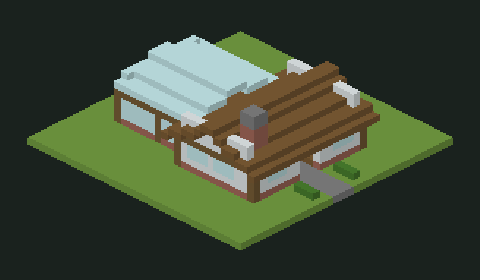
Open the actual block grid, prompt and structure downloads. A new paid house request costs 40 credits.
View house example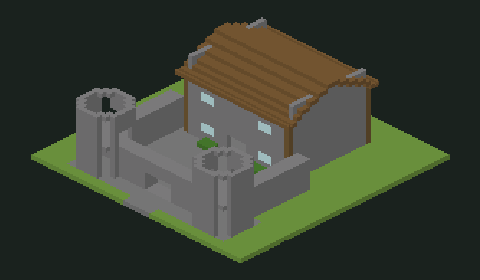
Check the towers, gate, layers and available files before paying for your own 40-credit castle request.
View castle exampleUse the account where you want your creations and credits to be stored.
Review the displayed price and complete checkout when payments are available.
Select a tool, check the credit cost and save your completed result.
The skin editor and public example downloads do not require a credit purchase. After signing in, you can try one free 32-block build preview per UTC day, subject to site capacity; its file download requires 40 credits.
Creating a new skin from text or a photo is a paid request. A paid house, castle or sculpture request also uses credits. Check the cost displayed before you generate.
At the current rate, one skin request reserves 10 credits and one paid house, castle or sculpture request reserves 40. A 200-credit balance can cover 20 skin requests, 5 build requests, or a mix such as 12 skins and 2 builds.
These counts describe requests, not a promise that every result will match your taste. Edit a usable skin manually when possible. A completed result still uses credits even if you decide to try a different design.
Choose a pack according to the number of ideas you want to try. The listed packs add credits to your signed-in account through a one-time purchase; they do not start a recurring monthly plan.
Review the checkout total and keep the receipt. Complete the purchase using the account where you want to generate your skins and builds, so the balance and saved creations stay together.
Credits are added after the server verifies a successful payment. Reaching the return page alone does not confirm payment. If the balance has not changed, check the purchase status before starting another checkout.
A confirmed failed generation returns its reserved credits once. If the AI provider has not confirmed whether a request was accepted, the task is held for review instead of being submitted again and risking another charge.
We will publish purchase or output feedback only with the creator’s permission and a checkable source.
No verified purchase review is available yet. Inspect the free example files above and the exact request prices before checkout.
What you can verify now
The sample skin and build files above can be opened before buying credits.
A new AI skin request reserves 10 credits; a paid house, castle or sculpture request reserves 40.
Repainting an existing 64×64 skin in the browser does not use generation credits.
Keep a note of what you plan to generate
List the skin or build ideas you want to try against your available credits. The note downloads to your device; it is not a review submitted to us.
The listed packs are one-time purchases. Buying a pack does not create a recurring subscription.
You can use the skin editor and download public example files without buying credits. After signing in, you can also try one free 32-block build preview per UTC day, subject to site capacity. Downloading that preview costs 40 credits.
Credits are reserved when a generation request is accepted. The server checks your balance before starting the task.
Confirmed failed tasks return the reserved credits once. An uncertain provider submission is held for review so it is not blindly repeated.
The balance updates after a successful payment has been verified. Returning from checkout alone is not treated as proof of payment.
